 |
|
| NAT Overload |
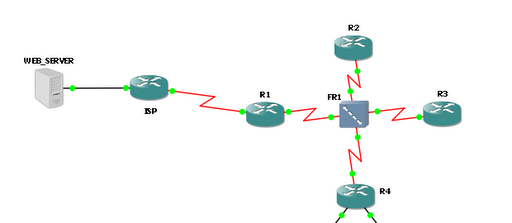
description : FRAME INTERFACE
no ip address
ip nat inside
encapsulation frame-relay
serial restart-delay 0
no frame-relay inverse-arp
!
interface Serial1/0.12 point-to-point
description : Link to R2
ip address 10.1.1.1 255.255.255.252
frame-relay interface-dlci 101
!
interface Serial1/1
description : Link to ISP
ip address 209.65.200.225 255.255.255.252
ip nat outside
encapsulation ppp
serial restart-delay 0
no cdp enable
ppp authentication chap
!
access-list 10 permit 10.0.0.0 0.7.255.255 log
access-list 192 deny ip 10.0.0.0 0.255.255.255 any log
access-list 192 deny ip 172.16.0.0 0.15.255.255 any log
access-list 192 deny ip 192.168.0.0 0.0.255.255 any log
So the above config should work right? or so believed
access group blocks RFC1918 addresses out to the internet and NAT overload set for internal clients. It took me hours to figure out what was wrong, combed google, read the cisco NAT / PAT config guide over and over, checked my notes, etc. I started to think maybe this is a bug in the IOS or something.
After clearing my head and troubleshooting from the bottom up, i noticed there were no log hits on the access-list 10 which means traffic wasn’t being checked. This is after disabling the ip access-group 192 out on the serial interface to ISP
Turned on ICMP debug on ISP router and to my not-so-supprise i saw the private ip addresses, knociing at the ISP router’s door
So, what does NAT and ACCESSLISTS have in common?
Why would the router route the traffic and not include NAT and ACCESSLISTS in the equation?
Answer = our good old friend CEF (Cisco Express Forwarding)
CEF is brilliant for bypassing the route processor and forwarding frames at wirespeed via hardware
So i quickly jumped to my console and typed “no ip route-cache”
interface Serial1/1
description : Link to ISP
ip address 209.65.200.225 255.255.255.252ip access-group 192 out
ip nat enableno ip route-cacheno ip route-cache cef
encapsulation ppp
serial restart-delay 0
no cdp enable
ppp authentication chap
And NAT in worked beautifully.
I also learned the old way of using
“ip nat inside source list ….”
“ip nat inside”
“ip nat outside”
can be replaced with
“ip nat enable”
“ip nat source list….”
https://learningnetwork.cisco.com/thread/26212
So there it is folks

 JUNIOR TAITT